Step into the world of mechanical keyboards, and you’ll quickly encounter an alphabet soup of layouts: 60%, 65%, 75%, and full-size, to name a few. Among them, the TKL mechanical keyboard stands out as a fan favorite, hitting the sweet spot between functionality and form. As the head creative at Yoasy.com and a mechanical keyboard engineer for over a decade, I’ve seen layouts come and go, but the TKL has remained a top contender for a good reason. It’s the perfect upgrade for anyone looking to reclaim desk space without sacrificing the essential keys needed for productivity and play.
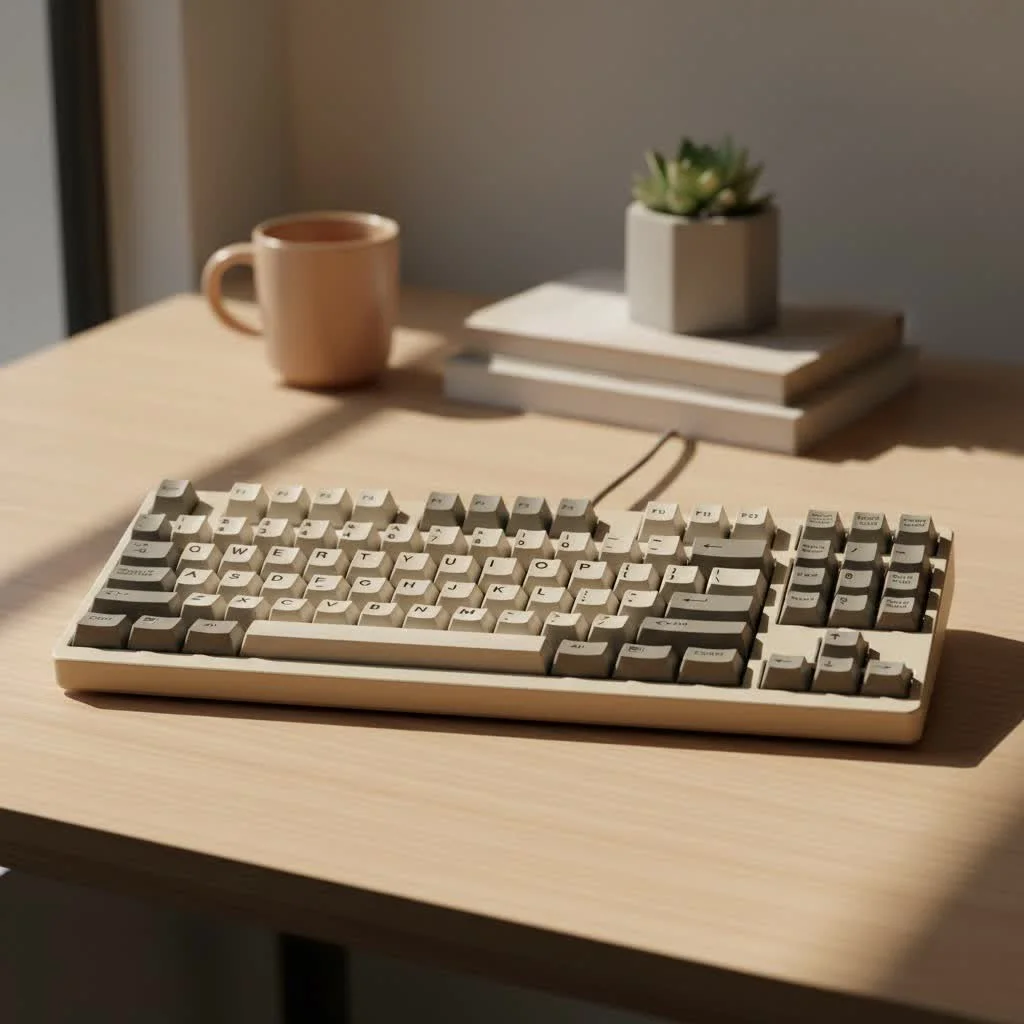
So, what exactly is this layout that has captured the hearts of gamers, programmers, and typing purists alike? Let’s dive in.
What is a TKL Mechanical Keyboard?
TKL stands for “Tenkeyless.” The name says it all: it’s a keyboard without the ten-key numeric keypad typically found on the far right of a standard, full-size board. This layout, also known as an 80% or 87-key layout, removes the numpad but retains all the other essential sections:
- The main alphanumeric cluster (A-Z, 0-9)
- The function row (F1-F12)
- The navigation cluster (Insert, Home, Page Up, etc.)
- The arrow keys
By removing the numpad, a TKL keyboard trims several inches off its width, leading to a more compact and symmetrical setup. This single change has a cascade of benefits that make it an incredibly popular choice.
The Big Deal: Why Choose a TKL Keyboard?
The move to a TKL mechanical keyboard isn’t just about aesthetics; it’s about tangible improvements to your workspace and user experience. After helping countless people make the switch, I’ve found the benefits consistently fall into three main categories.
1. Superior Ergonomics
This is perhaps the most significant advantage. With a full-size keyboard, you’re forced to place your mouse further to the right, creating an unnaturally wide and asymmetrical posture. This can lead to shoulder and wrist strain over long periods. A TKL keyboard allows you to bring your mouse closer to your body’s centerline, promoting a more natural “shoulders-square” position.
As veteran keyboard builder Alex Chen often says, “Good ergonomics isn’t a luxury; it’s a necessity for longevity in any desk-based profession. The TKL layout is one of the simplest and most effective ergonomic upgrades you can make.”
2. More Usable Desk Space
That reclaimed real estate on your desk is more valuable than you might think. For gamers, especially those who play first-person shooters, it means more room for wide, sweeping mouse movements without bumping into the side of your keyboard. For everyone else, it simply means a cleaner, more organized, and less cluttered workspace. A smaller keyboard provides more flexibility in how you arrange your desk for maximum comfort and efficiency.
3. Enhanced Portability and Aesthetics
|
Our Picks for the Best Mechanical Keyboard in 2026
As an Amazon Associate I earn from qualifying purchases.
|
||
| Num | Product | Action |
|---|---|---|
| 1 | AULA F99 Wireless Mechanical Keyboard,Tri-Mode BT5.0/2.4GHz/USB-C Hot Swappable Custom Keyboard,Pre-lubed Linear Switches,RGB Backlit Computer Gaming Keyboards for PC/Tablet/PS/Xbox |

|
| 2 | RK ROYAL KLUDGE S98 Mechanical Keyboard w/Smart Display & Knob, Top Mount 96% Wireless Mechanical Keyboard BT/2.4G/USB-C, Hot Swappable, Software Support, Creamy Sounding, 98 Keys |
|
| 3 | RK ROYAL KLUDGE R98 Pro Wired Mechanical Keyboard, 96% Creamy Gaming Keyboard RGB Backlit with Number Pad and Volume Knob, Gasket Mount, MDA Profile PBT Keycaps, Hot Swappable Pre-lubed Linear Switch |
|
| 4 | SteelSeries USB Apex 5 Hybrid Mechanical Gaming Keyboard – Per-Key RGB Illumination – Aircraft Grade Aluminum Alloy Frame – OLED Smart Display (Hybrid Blue Switch) |
|
| 5 | Redragon Mechanical Gaming Keyboard Wired, 11 Programmable Backlit Modes, Hot-Swappable Red Switch, Anti-Ghosting, Double-Shot PBT Keycaps, Light Up Keyboard for PC Mac |
|
| 6 | Womier S-K80 75% Keyboard with Color Multimedia Display Mechanical Gaming Keyboard Creamy Sound, Wired Hot Swappable Gasket Mount RGB Custom Key board, Pre-lubed Stabilizer for Mac/Win, Black Kanagawa |
|
| 7 | AULA F75 Pro Wireless Mechanical Keyboard,75% Hot Swappable Custom Keyboard with Knob,RGB Backlit,Pre-lubed Reaper Switches,Side Printed PBT Keycaps,2.4GHz/USB-C/BT5.0 Mechanical Gaming Keyboards |
|
| 8 | EPOMAKER x Aula F75 Gasket Mechanical Keyboard, 75% Wireless Hot Swappable Gaming Keyboard with Five-Layer Padding&Knob, Bluetooth/2.4GHz/USB-C, RGB (Light Blue, LEOBOG Reaper Switch) |
|
| 9 | Logitech MX Mechanical Wireless Illuminated Performance Keyboard, Tactile Quiet Switches, Backlit Keys, Bluetooth, USB-C, macOS, Windows, Linux, iOS, Android, Metal, Graphite |
|
| 10 | AK96 Smart Mechanical Keyboard Gaming, 96 Keys Full Size with LED Colorful Backlit, Clicky Creamy Sounding, USB Wired Computer Keyboard with Volume Knob for PC, Mac, Windows(Grey) |
|
A TKL keyboard is lighter and more compact than its full-sized sibling, making it much easier to pack up and take on the go. Whether you’re heading to a LAN party, working from a coffee shop, or just moving between home and the office, a TKL is a far more convenient travel companion. Aesthetically, the compact and symmetrical look of a TKL keyboard fits perfectly into a modern, minimalist desk setup.
Is There a Downside? The Missing Numpad
Of course, no layout is perfect for everyone. The primary and only real drawback of a TKL mechanical keyboard is the absence of a dedicated number pad. If your work involves heavy data entry, accounting, or frequent use of spreadsheets, you will likely miss the speed and convenience of a numpad.
However, for most users, the numpad is rarely touched. And for those who only need it occasionally, a standalone USB numpad is an excellent, inexpensive solution that gives you the best of both worlds.
How to Choose the Right TKL Mechanical Keyboard
Ready to make the jump? Here’s a quick guide to what you should look for. This is where the real fun begins, as the TKL form factor is one of the most popular for customization.
Keyboard Switches: The Heart of the Feel
The switch is the mechanism under each key that registers a keystroke. The type of switch determines how a key feels and sounds. There are three main types:
- Linear: Smooth and consistent, with no tactile bump. Preferred by many gamers for their speed and uninterrupted travel. (e.g., Cherry MX Red, Gateron Red)
- Tactile: Provides a noticeable “bump” in the middle of the keystroke, confirming actuation. A great all-around choice for typing and gaming. (e.g., Cherry MX Brown, Gateron Brown)
- Clicky: Offers a tactile bump along with a distinct “click” sound. Very satisfying for typists, but can be loud for office environments. (e.g., Cherry MX Blue, Gateron Blue)
Many modern TKL boards are also hot-swappable, meaning you can easily pull out and replace the switches without any soldering. This is a fantastic feature for enthusiasts who want to experiment with different switch types.
Keycaps and Build Quality
Keycaps are the plastic caps you press. The material and profile significantly impact the feel and longevity of your board.
- Material: Look for PBT (polybutylene terephthalate) keycaps over ABS (acrylonitrile butadiene styrene). PBT is more durable, resistant to the oils on your fingers (so it won’t develop a “shine” over time), and has a pleasant textured feel.
- Profile: This refers to the shape and height of the keycaps. OEM and Cherry profiles are the most common and are sculpted for comfort.
Build quality also extends to the keyboard case. Aluminum cases offer a premium weight and feel, while high-quality plastic cases can provide a slightly softer typing experience and are more budget-friendly.
Extra Features
- Connectivity: Do you need a wired or wireless board? Many TKL keyboards now offer Bluetooth and 2.4GHz wireless options for a cleaner setup.
- RGB Lighting: Customizable backlighting is great for personalizing your setup and for typing in low-light conditions.
- Programmability: Advanced users may want a keyboard that supports firmware like QMK/VIA, allowing for complete key remapping and macros.
Frequently Asked Questions (FAQ)
What does TKL keyboard mean?
TKL stands for “Tenkeyless.” It refers to a keyboard layout that does not have the 10-key numeric keypad on the right side, resulting in a more compact, 87-key design that saves desk space.
Is a TKL keyboard good for gaming?
Yes, a TKL keyboard is excellent for gaming. Its compact size provides more room for mouse movement, which is a significant advantage in many games. The ergonomic benefit of keeping your hands closer together can also reduce fatigue during long gaming sessions.
Can you still type numbers on a TKL keyboard?
Absolutely. You can still type numbers using the horizontal number row located above the letter keys, just as you would on any standard keyboard. You only lose the dedicated, calculator-style numpad.
What is the difference between a 75% and a TKL keyboard?
A TKL (or 80%) keyboard has a standard layout for its keys, just without the numpad. A 75% keyboard is even more compact; it squishes the arrow keys and navigation cluster (like Page Up, Page Down) closer to the main keys to save more space, resulting in a non-standard layout.
Are TKL keyboards better for ergonomics?
Yes, for most people, TKL keyboards offer better ergonomics. By reducing the keyboard’s width, you can place your mouse closer to your body, allowing for a more natural and symmetrical posture that reduces strain on your shoulder, arm, and wrist.
The Final Word
The TKL mechanical keyboard represents a perfect middle ground. It sheds the bulk of a full-size board without sacrificing the critical keys that most of us rely on for daily work and play. It offers tangible benefits in ergonomics, desk space, and aesthetics, making it an ideal choice for a wide range of users.
If you don’t rely on a numpad for heavy data entry, I encourage you to try a TKL layout for your next keyboard. The comfort and convenience it brings to your setup might just surprise you. Happy typing
Get our weekly buyer guide
Practical specs, not advice. Unsubscribe anytime.
