The Keychron K2 (Version 2) is the best Keychron mechanical keyboard for office work, offering a compact 75% layout, versatile connectivity, and a comfortable typing experience suitable for daily professional tasks. Its robust build and hot-swappable switch options make it a highly adaptable choice for various office environments. This guide explores several Keychron models, detailing their suitability for different office needs, from quiet typing to ergonomic design.

Quick comparison
| Model | Layout | Switch Type | Connectivity | Key Features for Office |
|---|---|---|---|---|
| Keychron K2 (Version 2) | 75% | Gateron G Pro (Hot-swappable) | Bluetooth 5.1 & USB-C | Compact, versatile, good for small desks |
| Keychron K8 Pro | Tenkeyless (TKL) | Gateron G Pro (Hot-swappable) | Bluetooth 5.1 & USB-C | QMK/VIA support, full functionality, robust build |
| Keychron K3 Pro | 75% Low-Profile | Keychron Low-Profile Optical/Mechanical (Hot-swappable) | Bluetooth 5.1 & USB-C | Ultra-slim, portable, quiet low-profile switches |
| Keychron Q1 Pro | 75% | Keychron K Pro (Hot-swappable) | Bluetooth 5.1 & USB-C | Premium build, gasket mount, superior typing feel |
What Office Work needs from a Mechanical Keyboard
Office work demands specific features from a mechanical keyboard to enhance productivity and comfort. Key considerations include switch type, which directly impacts typing feel and noise levels. Tactile or linear switches are generally preferred over clicky switches for a quieter office environment. Connectivity options are also crucial; wireless capabilities like Bluetooth offer a clutter-free desk, while wired USB-C ensures reliable performance. Ergonomics play a significant role in preventing strain during long typing sessions, making features like adjustable feet and wrist rests important. A compact layout, such as 75% or TKL, can save valuable desk space without sacrificing essential keys. Durability and build quality ensure the keyboard withstands daily use, providing a long-lasting investment. Finally, programmability and hot-swappable switches allow for customization to suit individual preferences and workflow.
Detailed reviews
Keychron K2 (Version 2)
The Keychron K2 (Version 2) stands out as an excellent choice for office work due to its balanced features and compact design. Its 75% layout provides all essential keys, including function row and arrow keys, without occupying excessive desk space. Users can choose between Gateron G Pro Red, Blue, or Brown switches, with Brown switches offering a good balance of tactile feedback and moderate noise, ideal for an office setting. The hot-swappable PCB allows for easy switch changes without soldering, enabling users to experiment with different switch types to find their perfect typing feel. Connectivity is versatile, supporting both Bluetooth 5.1 for wireless convenience and USB-C for a stable wired connection. The K2 (Version 2) also features adjustable feet for ergonomic typing angles and a durable aluminum frame option, ensuring longevity and a premium feel. Its robust battery life further enhances its portability and wireless utility.
Keychron K8 Pro
For those who prefer a traditional Tenkeyless (TKL) layout, the Keychron K8 Pro offers a robust and highly customizable option for office work. This keyboard retains the full function row and navigation cluster, making it familiar for users accustomed to standard layouts. The K8 Pro is a significant upgrade with QMK/VIA support, allowing for extensive key remapping and macro creation, which can significantly boost productivity for specific tasks. It features hot-swappable Gateron G Pro switches, providing flexibility to choose between linear, tactile, or clicky options, though tactile or linear are recommended for office use. Its double-shot PBT keycaps offer superior durability and resistance to shine compared to ABS keycaps. The K8 Pro’s gasket-mounted design provides a softer, more comfortable typing experience, reducing finger fatigue during long workdays. Both Bluetooth 5.1 and USB-C connectivity ensure seamless integration into any office setup.
Keychron K3 Pro
The Keychron K3 Pro is an ideal choice for office workers who prioritize portability and a low-profile design. Its ultra-slim profile and lightweight construction make it easy to carry between different workstations or for travel. Despite its slimness, the K3 Pro maintains a 75% layout, providing essential keys in a compact form factor. It utilizes Keychron’s low-profile optical or mechanical switches, which offer a shorter travel distance and a quieter typing experience compared to standard mechanical switches, making it particularly suitable for open-plan offices. The hot-swappable feature allows users to easily swap switches to fine-tune their typing feel. With Bluetooth 5.1 and USB-C connectivity, it offers reliable wireless and wired options. The K3 Pro’s sleek aesthetic and comfortable typing angle, even without a wrist rest, contribute to a productive and comfortable office environment.
Routine fit
Integrating a Keychron mechanical keyboard into your office routine can significantly enhance daily productivity and comfort. For a typical 9-to-5 desk job involving extensive typing, a model like the Keychron K8 Pro with its TKL layout and QMK/VIA support allows for custom macros, streamlining repetitive tasks. If your work involves frequent meetings or hot-desking, the portable Keychron K3 Pro offers a lightweight, low-profile solution that’s easy to transport and set up quickly. For those with limited desk space, the compact 75% layout of the Keychron K2 (Version 2) provides all necessary keys without clutter. The hot-swappable switches across these models mean you can adjust the typing feel to match your preference, whether you need quiet linear switches for focused work or tactile switches for satisfying feedback. Wireless connectivity options free up USB ports and reduce cable clutter, contributing to a cleaner, more organized workspace.
FAQs
What switch type is best for office work?
For office work, tactile switches like Gateron G Pro Brown or linear switches like Gateron G Pro Red are generally recommended. Tactile switches provide a noticeable bump at the actuation point, offering feedback without the loud click of blue switches, making them less disruptive in a shared office. Linear switches offer a smooth, consistent keystroke from top to bottom, which can be very quiet and fast for typing, especially if you bottom out softly. Clicky switches are usually avoided in office settings due to their distinct audible click, which can be distracting to colleagues. Hot-swappable keyboards allow you to try different switch types to find your personal preference without buying a new keyboard.
Are Keychron keyboards compatible with Mac and Windows?
Yes, most Keychron mechanical keyboards are designed with full compatibility for both macOS and Windows operating systems. They typically feature a physical switch on the side to toggle between Mac and Windows modes, which reconfigures the modifier keys (e.g., Alt/Option, Win/Command) to match the respective OS layout. Many models also come with extra keycaps for both operating systems, allowing users to visually match their keyboard to their computer. This dual compatibility makes Keychron keyboards a versatile choice for users who switch between different operating systems or work in mixed-OS environments.
Do Keychron keyboards come with a wrist rest?
Keychron keyboards typically do not include a wrist rest in the standard package. However, Keychron offers a range of wooden and resin wrist rests as separate accessories, specifically designed to match the dimensions and aesthetics of their popular keyboard models. A wrist rest is highly recommended for ergonomic comfort, especially during long typing sessions, as it helps maintain a neutral wrist position and reduces strain. While not bundled, the availability of purpose-built wrist rests ensures users can easily find a suitable ergonomic solution to complement their Keychron keyboard.
What is the benefit of hot-swappable switches for office use?
Hot-swappable switches offer significant benefits for office use by providing unparalleled customization and longevity. This feature allows users to easily change out switches without soldering, meaning you can experiment with different switch types (e.g., quieter linear switches for focused work, tactile switches for more feedback) to find the perfect feel for your typing style and office environment. It also means that if a switch fails, you can replace just that single switch rather than the entire keyboard, extending the lifespan of your investment. This flexibility ensures your keyboard can adapt to evolving preferences or changing office needs over time.
Is Bluetooth connectivity reliable for office work?
Yes, Bluetooth connectivity in modern Keychron keyboards is generally very reliable for office work. Keychron models often feature Bluetooth 5.1, which offers improved stability, faster pairing, and better power efficiency compared to older Bluetooth versions. This allows for a clean, cable-free desk setup and easy switching between multiple devices (e.g., a desktop, laptop, and tablet). While a wired USB-C connection always provides the most stable and lowest-latency experience, Bluetooth is perfectly adequate for most office tasks, including extensive typing and general computer use, without noticeable lag or disconnections.
Verdict
For office work, the Keychron K2 (Version 2) emerges as the top recommendation, striking an excellent balance between compact design, versatile connectivity, and a comfortable typing experience. Its 75% layout is efficient for desk space, and the hot-swappable switches allow for personalized typing feel, crucial for long workdays. While the K8 Pro offers QMK/VIA customization and the K3 Pro excels in portability, the K2 (Version 2) provides a robust and adaptable solution suitable for a wide range of professional tasks. Investing in a Keychron mechanical keyboard means choosing durability, ergonomic considerations, and a significantly improved typing experience over standard office keyboards.
Frequently Asked Questions
What switch type is best for office work?
For office work, tactile switches like Gateron G Pro Brown or linear switches like Gateron G Pro Red are generally recommended. Tactile switches provide feedback without the loud click of blue switches, making them less disruptive in a shared office. Linear switches offer a smooth, consistent keystroke, which can be very quiet and fast for typing. Clicky switches are usually avoided in office settings due to their distinct audible click.
Are Keychron keyboards compatible with Mac and Windows?
Yes, most Keychron mechanical keyboards are designed with full compatibility for both macOS and Windows operating systems. They typically feature a physical switch to toggle between Mac and Windows modes, reconfiguring modifier keys to match the respective OS layout. Many models also come with extra keycaps for both operating systems, making them versatile for users who switch between different operating systems.
Do Keychron keyboards come with a wrist rest?
Keychron keyboards typically do not include a wrist rest in the standard package. However, Keychron offers a range of wooden and resin wrist rests as separate accessories, specifically designed to match the dimensions and aesthetics of their popular keyboard models. A wrist rest is highly recommended for ergonomic comfort, especially during long typing sessions, as it helps maintain a neutral wrist position and reduces strain.
What is the benefit of hot-swappable switches for office use?
Hot-swappable switches offer significant benefits for office use by providing unparalleled customization and longevity. This feature allows users to easily change out switches without soldering, enabling experimentation with different switch types to find the perfect feel for typing style and office environment. It also means that if a switch fails, you can replace just that single switch rather than the entire keyboard, extending the lifespan of your investment.
Is Bluetooth connectivity reliable for office work?
Yes, Bluetooth connectivity in modern Keychron keyboards is generally very reliable for office work. Keychron models often feature Bluetooth 5.1, which offers improved stability, faster pairing, and better power efficiency compared to older Bluetooth versions. This allows for a clean, cable-free desk setup and easy switching between multiple devices. While a wired USB-C connection always provides the most stable experience, Bluetooth is perfectly adequate for most office tasks without noticeable lag or disconnections.
Get our weekly buyer guide
Practical specs, not advice. Unsubscribe anytime.
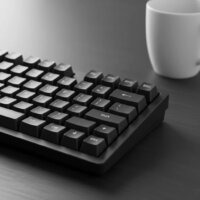
I’ve been using the Keychron K2 (Version 2) for a few weeks now, and it’s fantastic for my home office setup. The 75% layout is perfect for saving desk space without sacrificing essential keys. I opted for the Gateron G Pro switches, and they provide a really satisfying typing experience that’s not too loud for calls.
The hot-swappable switch options on the K2 V2 are a game-changer. I love being able to try out different switches without buying a whole new keyboard. Bluetooth connectivity has been solid, and it switches between my laptop and tablet seamlessly. My only minor gripe is that the keycaps feel a little thin, but that’s an easy upgrade down the line.
After reading about the different Keychron models, I decided on the K2 (Version 2) for its versatility and compact size. It’s been a dream for my daily professional tasks. The USB-C connection is super reliable, and I appreciate the robust build quality. It feels like it will last for years, even with heavy use.
I got the Keychron K2 (Version 2) hoping it would be my ultimate office keyboard, but I’m a bit on the fence. While the compact design is great, I found the default keycaps a bit too flat for my taste, making long typing sessions less comfortable than I’d hoped. I might need to invest in some aftermarket keycaps to really make it work for me. The build quality is solid though.