The Keychron Q1 Pro is the best Keychron mechanical keyboard for programming, offering a robust aluminum build, QMK/VIA programmability, and a comfortable gasket-mounted design. Programmers require precision, durability, and customization from their tools, and Keychron delivers several excellent options. This guide explores the top Keychron models, highlighting features that benefit coding, such as switch types, layout options, and software compatibility, ensuring you select the ideal keyboard for your development needs.
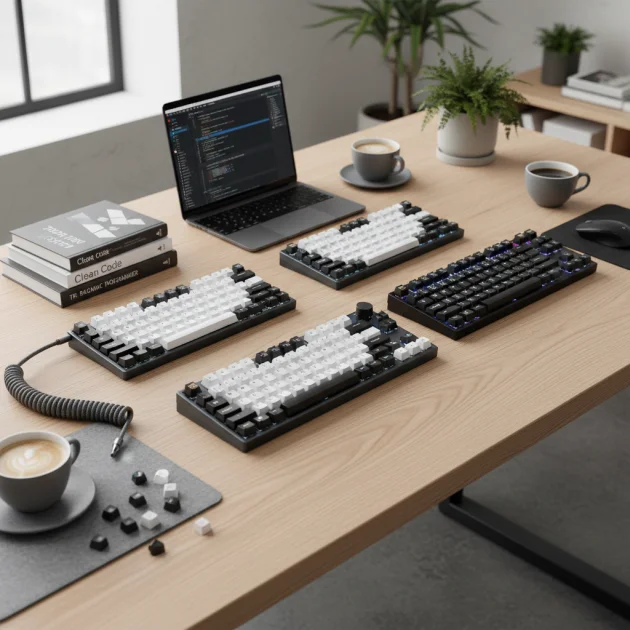
Quick comparison
| Model | Layout | Connectivity | Key Features for Programming |
|---|---|---|---|
| Keychron Q1 Pro | 75% | Wireless (Bluetooth 5.1) & Wired (USB-C) | QMK/VIA, Gasket Mount, Aluminum Frame, Hot-swappable |
| Keychron K8 Pro | Tenkeyless (TKL) | Wireless (Bluetooth 5.1) & Wired (USB-C) | QMK/VIA, Gasket Mount, Hot-swappable, ABS Frame |
| Keychron K2 Pro | 75% | Wireless (Bluetooth 5.1) & Wired (USB-C) | QMK/VIA, Gasket Mount, Hot-swappable, ABS Frame |
What Programmers Need from a Mechanical Keyboard
Programmers need a mechanical keyboard that prioritizes accuracy, speed, and comfort during long coding sessions. Key features include reliable key switches, with tactile or linear options often preferred for their consistent feedback and reduced fatigue. Hot-swappable sockets are crucial, allowing developers to experiment with different switch types without soldering, adapting the keyboard to specific coding tasks or personal preferences. Full QMK/VIA compatibility is essential for remapping keys, creating macros, and customizing layers, which significantly streamlines workflow for complex commands and shortcuts. A durable build, often aluminum, ensures longevity and stability on the desk. Layouts like 75% or TKL are popular as they save desk space while retaining essential function keys and arrow keys. Ergonomics, such as adjustable typing angles and a comfortable keycap profile, also play a vital role in preventing strain over extended periods of use. Consistent and responsive key presses are paramount for maintaining focus and reducing errors in code.
Detailed Reviews
Keychron Q1 Pro
The Keychron Q1 Pro stands out as an exceptional choice for programmers due to its premium features and extensive customization. Its 75% layout provides a compact footprint while retaining all necessary function keys and a dedicated row for navigation, which is ideal for coding environments. The full aluminum CNC machined body offers superior durability and a substantial feel, preventing any deck flex during intense typing. A gasket-mounted design enhances typing comfort by providing a softer, more flexible feel, reducing finger fatigue over long coding sessions. With full QMK/VIA support, programmers can remap every key, create intricate macros, and configure multiple layers to optimize their workflow for specific programming languages or IDEs. The hot-swappable sockets allow for easy switch changes, enabling users to fine-tune their typing experience without soldering. Connectivity options include both Bluetooth 5.1 for wireless convenience and a reliable USB-C wired connection. The Q1 Pro typically comes with Keychron K Pro switches, offering a smooth and consistent typing experience.
Keychron K8 Pro
The Keychron K8 Pro offers a robust Tenkeyless (TKL) layout, making it a highly functional and space-efficient option for programmers. The TKL design retains the essential function row, arrow keys, and navigation cluster, which are frequently used in coding, while omitting the less critical numpad. This balance makes it suitable for those who need a full set of keys without the bulk of a full-size keyboard. Like other Pro series models, the K8 Pro features full QMK/VIA support, allowing for comprehensive key remapping and macro creation, which is invaluable for streamlining programming tasks. Its gasket-mounted design provides a comfortable and satisfying typing experience, reducing strain during extended coding sessions. The hot-swappable switches mean users can easily experiment with different switch types, from linear to tactile, to find their preferred feel. The K8 Pro includes both Bluetooth 5.1 and USB-C connectivity, offering flexibility for various setups. Its ABS plastic frame provides a sturdy build while keeping the price more accessible than aluminum alternatives.
Keychron K2 Pro
The Keychron K2 Pro is an excellent 75% layout mechanical keyboard that balances compactness with functionality, making it a strong contender for programmers. Its smaller footprint frees up desk space, yet it retains all the crucial keys, including the function row and arrow keys, which are vital for efficient coding. The K2 Pro features full QMK/VIA programmability, empowering developers to customize key assignments, create complex macros, and set up multiple layers for different programming environments. This level of customization significantly enhances productivity by allowing quick access to frequently used commands. The gasket-mounted design contributes to a comfortable and responsive typing feel, reducing hand fatigue during long hours of coding. Hot-swappable switch sockets provide the flexibility to change switches without soldering, enabling programmers to fine-tune their typing experience with ease. With both Bluetooth 5.1 and USB-C connectivity, the K2 Pro offers versatile options for connecting to various devices. Its durable ABS plastic frame ensures a solid build quality suitable for daily use.
Routine Fit
For programmers, a Keychron mechanical keyboard integrates seamlessly into various daily routines, from intense debugging sessions to collaborative coding projects. The customizable layouts via QMK/VIA allow developers to create specific keymaps for different programming languages or IDEs, switching between them effortlessly. This adaptability reduces mental load and speeds up common tasks. The durable construction of Keychron keyboards, especially models with aluminum frames, ensures they withstand the rigors of daily use, providing a reliable tool for years. Wireless connectivity options offer flexibility for clean desk setups or for moving between workstations, while wired connections guarantee zero latency for critical tasks. The comfortable typing experience, often enhanced by gasket mounts and preferred switch types, helps maintain focus and productivity during long hours, preventing discomfort and fatigue. Whether working from home, in an office, or a co-working space, a Keychron keyboard enhances the programming experience.
FAQs
What is QMK/VIA and why is it important for programmers?
QMK/VIA refers to open-source firmware and software that allows for extensive customization of mechanical keyboards. QMK (Quantum Mechanical Keyboard) is the firmware, and VIA is a graphical user interface for configuring it. For programmers, QMK/VIA is crucial because it enables remapping any key, creating complex macros, and setting up multiple layers. This means you can assign specific functions, shortcuts, or even entire code snippets to single key presses, significantly streamlining your workflow. For example, you can create a layer for Python development with specific hotkeys for debugging or compiling, then switch to another layer for web development. This level of control enhances efficiency and reduces repetitive strain.
Are hot-swappable switches beneficial for coding?
Yes, hot-swappable switches are highly beneficial for coding. This feature allows you to change the mechanical switches on your keyboard without soldering, simply by pulling them out and pushing new ones in. For programmers, this means you can experiment with different switch types (e.g., linear for smooth typing, tactile for feedback) to find what feels most comfortable and efficient for your coding style. You might prefer a lighter switch for rapid text entry and a heavier one for command keys. This flexibility ensures your keyboard can adapt to your evolving preferences or specific project needs, optimizing comfort and reducing fatigue during long coding sessions.
Which Keychron layout is best for programming?
For programming, the 75% and Tenkeyless (TKL) layouts are generally considered the best Keychron options. A 75% layout, like the Keychron Q1 Pro or K2 Pro, is compact but retains the essential function row, arrow keys, and a few navigation keys, which are frequently used in coding. This saves desk space without sacrificing critical functionality. A TKL layout, such as the Keychron K8 Pro, offers a bit more spacing between key clusters and includes a full set of navigation keys, making it comfortable for those who prefer a slightly larger board but still want to omit the numpad. Both layouts provide a good balance of functionality and desk real estate for developers.
Is a wireless Keychron keyboard suitable for programming?
Yes, a wireless Keychron keyboard is entirely suitable for programming, especially models with reliable Bluetooth 5.1 connectivity. Modern wireless keyboards offer minimal latency, making them indistinguishable from wired connections for most programming tasks. The primary benefit is a cleaner desk setup, free from cable clutter, which can improve focus and aesthetics. Many Keychron wireless models, like the Q1 Pro or K8 Pro, also include a USB-C wired option, providing a fallback for critical tasks or when charging. This dual connectivity offers flexibility, allowing programmers to switch between devices or ensure a stable connection when needed, making them versatile tools for any development environment.
What keycap profile is recommended for programmers?
For programmers, a comfortable and ergonomic keycap profile is crucial for long typing sessions. OEM and Cherry profiles are widely recommended. OEM is a common, sculpted profile found on many keyboards, offering a familiar feel with varying heights across rows. Cherry profile is slightly lower and more uniform than OEM, often preferred for its subtle sculpting and comfortable angle, which can reduce finger travel and fatigue. Both profiles provide a good balance of aesthetics and ergonomics. Ultimately, the best keycap profile is subjective and depends on individual preference, but starting with OEM or Cherry is a safe bet for most programmers due to their widespread acceptance and comfort.
Verdict
For programmers seeking the ultimate Keychron mechanical keyboard, the Keychron Q1 Pro stands out as the top recommendation. Its premium aluminum construction, gasket-mounted design, and comprehensive QMK/VIA programmability provide an unparalleled typing experience and customization potential. The 75% layout offers a perfect balance of compactness and functionality, retaining all essential keys for efficient coding. While the K8 Pro and K2 Pro offer excellent value with their TKL and 75% layouts respectively, the Q1 Pro’s superior build quality and refined typing feel make it the definitive choice for professionals who demand the best tools for their craft. Investing in the Q1 Pro ensures a durable, comfortable, and highly adaptable keyboard that will enhance productivity and comfort during countless hours of coding.
Frequently Asked Questions
What is QMK/VIA and why is it important for programmers?
QMK/VIA refers to open-source firmware and software that allows for extensive customization of mechanical keyboards. For programmers, QMK/VIA is crucial because it enables remapping any key, creating complex macros, and setting up multiple layers. This means you can assign specific functions, shortcuts, or even entire code snippets to single key presses, significantly streamlining your workflow.
Are hot-swappable switches beneficial for coding?
Yes, hot-swappable switches are highly beneficial for coding. This feature allows you to change the mechanical switches on your keyboard without soldering, simply by pulling them out and pushing new ones in. For programmers, this means you can experiment with different switch types (e.g., linear for smooth typing, tactile for feedback) to find what feels most comfortable and efficient for your coding style.
Which Keychron layout is best for programming?
For programming, the 75% and Tenkeyless (TKL) layouts are generally considered the best Keychron options. A 75% layout, like the Keychron Q1 Pro or K2 Pro, is compact but retains the essential function row, arrow keys, and a few navigation keys, which are frequently used in coding. A TKL layout, such as the Keychron K8 Pro, offers a bit more spacing between key clusters.
Is a wireless Keychron keyboard suitable for programming?
Yes, a wireless Keychron keyboard is entirely suitable for programming, especially models with reliable Bluetooth 5.1 connectivity. Modern wireless keyboards offer minimal latency, making them indistinguishable from wired connections for most programming tasks. Many Keychron wireless models, like the Q1 Pro or K8 Pro, also include a USB-C wired option, providing a fallback for critical tasks or when charging.
What keycap profile is recommended for programmers?
For programmers, a comfortable and ergonomic keycap profile is crucial for long typing sessions. OEM and Cherry profiles are widely recommended. OEM is a common, sculpted profile found on many keyboards, offering a familiar feel with varying heights across rows. Cherry profile is slightly lower and more uniform than OEM, often preferred for its subtle sculpting and comfortable angle.
Get our weekly buyer guide
Practical specs, not advice. Unsubscribe anytime.
As a programmer, durability is key, and Keychron really delivers. My K8 Pro has been a workhorse, handling hours of typing every day without a hitch. The gasket-mounted design really does make a difference in typing fatigue. I’ve customized my keybinds with QMK and it’s made my workflow so much smoother. Highly recommend for anyone in development.
I picked up the Keychron K2 Pro because I liked the 75% layout and the wireless option. While it’s a decent keyboard, I found the ABS frame a bit less premium feeling compared to some other boards I’ve tried. It’s still good for the price, but I wish it had the same robust feel as the Q1 Pro mentioned. The QMK/VIA is great though.
I’ve been using the Keychron Q1 Pro for a few weeks now, and it’s absolutely fantastic for coding. The aluminum frame feels incredibly solid, and the gasket mount makes typing super comfortable during long programming sessions. QMK/VIA compatibility was a huge selling point for me, letting me customize every key exactly how I like it. Definitely worth the investment if you’re a serious developer.
The Keychron K8 Pro is a solid choice, especially with the hot-swappable switches. I appreciate being able to try different switch types without buying a whole new board. The tenkeyless layout is perfect for my desk setup, giving me more mouse room. Bluetooth connectivity has been reliable too, which is a plus for a cleaner workspace.