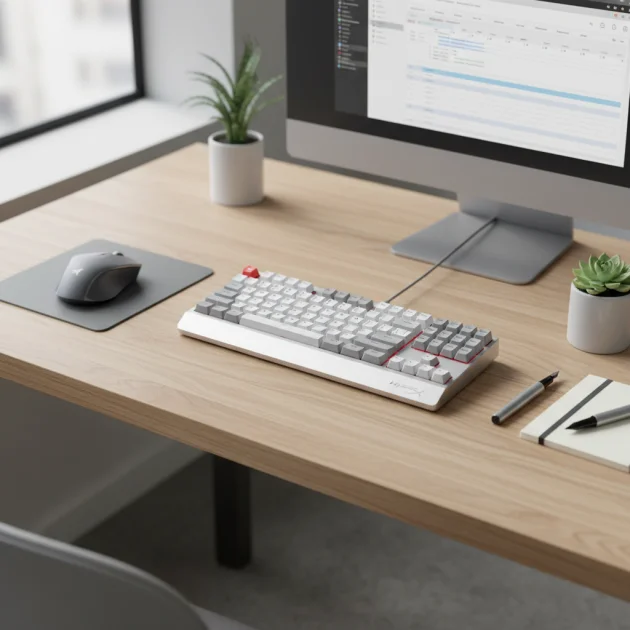
The HyperX Alloy Origins Core is the best HyperX mechanical keyboard for office work, primarily due to its compact Tenkeyless (TKL) design, durable aluminum frame, and choice of quiet HyperX Red linear switches. This combination offers a balance of performance and professionalism, making it suitable for various office environments by minimizing noise and maximizing desk space.
Quick comparison
| Model | Switch Type | Layout | Key Features for Office |
|---|---|---|---|
| HyperX Alloy Origins Core | HyperX Red (Linear) | Tenkeyless (TKL) | Compact, quiet, durable aluminum body |
| HyperX Alloy Origins | HyperX Red (Linear) | Full-size | Full numpad, quiet, robust build |
| HyperX Alloy FPS Pro | Cherry MX Red (Linear) | Tenkeyless (TKL) | Compact, reliable Cherry switches, portable |
What Office Work needs from a Mechanical Keyboard
Office work demands specific features from a mechanical keyboard to ensure productivity and maintain a professional environment. First and foremost, switch type is crucial. Linear switches, like HyperX Red or Cherry MX Red, are often preferred for their smooth, consistent keystrokes and quieter operation compared to clicky or tactile switches. This reduces noise distractions for colleagues and allows for extended typing sessions without fatigue. A compact layout, such as a Tenkeyless (TKL) design, saves valuable desk space, promoting better ergonomics by allowing the mouse to be closer to the keyboard. However, for data entry roles, a full-size keyboard with a dedicated numpad remains essential. Durability is another key factor; a robust build with an aluminum frame ensures the keyboard withstands daily use. Backlighting, while often associated with gaming, can be beneficial for dimly lit offices or late-night work, provided it’s subtle and not overly flashy. Programmable keys or macros can streamline repetitive tasks, boosting efficiency. Finally, a comfortable typing experience, achieved through stable keycaps and a solid base, prevents strain during long hours at the desk.
Detailed reviews
HyperX Alloy Origins Core
The HyperX Alloy Origins Core stands out as an excellent choice for office professionals seeking a compact and efficient mechanical keyboard. Its Tenkeyless (TKL) form factor saves significant desk space, making it ideal for smaller workstations or for those who prefer more room for mouse movement. Equipped with HyperX Red linear mechanical switches, this keyboard offers a smooth and quiet typing experience, minimizing noise disruption in a shared office environment. The switches have a short actuation point and low actuation force, which can reduce finger fatigue during long typing sessions. The keyboard features a full aluminum body, providing exceptional durability and a premium feel that is both professional and robust. Customizable RGB backlighting, while present, can be set to a subtle white or turned off entirely for a more understated look. A detachable USB-C cable enhances portability and simplifies cable management. The Alloy Origins Core combines a sleek design with reliable performance, making it a strong contender for office use.
HyperX Alloy Origins
For users who require a full-size layout with a dedicated numpad, the HyperX Alloy Origins is a top-tier option for office work. This keyboard maintains the same high-quality build as its TKL counterpart, featuring a full aircraft-grade aluminum frame that ensures stability and longevity. It also utilizes HyperX Red linear switches, known for their quiet operation and smooth keystrokes, which are highly suitable for a professional setting where noise levels are a concern. The full-size layout is particularly beneficial for roles involving extensive data entry, accounting, or any task that frequently uses numerical inputs. Despite its larger footprint, the Alloy Origins retains a relatively slim profile, preventing it from feeling overly bulky on the desk. Its customizable RGB lighting can be adjusted to a professional, single-color backlight or disabled. The keyboard’s robust construction and responsive switches make it a reliable tool for demanding office tasks, offering both comfort and efficiency.
HyperX Alloy FPS Pro
The HyperX Alloy FPS Pro is another strong contender for office use, especially for those prioritizing portability and a no-frills, reliable typing experience. This Tenkeyless (TKL) keyboard features genuine Cherry MX Red linear switches, a gold standard in mechanical keyboards, renowned for their consistent feel and quiet operation. Cherry MX Red switches are a popular choice for office environments due to their smooth travel and lack of an audible click, ensuring minimal disturbance. The Alloy FPS Pro boasts a solid steel frame, providing excellent stability and durability, capable of withstanding the rigors of daily office use and frequent travel between workstations. Its compact design, coupled with a detachable braided USB cable, makes it incredibly easy to transport. While it lacks some of the advanced RGB customization of the Origins series, its red LED backlighting can be set to a static, professional glow or turned off. This keyboard is a straightforward, high-performance option for professionals who value reliability and a classic mechanical typing feel.
Routine fit
Integrating a HyperX mechanical keyboard into your office routine can significantly enhance your daily workflow. For the average office worker, the quiet linear switches found in models like the HyperX Alloy Origins Core or Alloy Origins ensure that your typing doesn’t disrupt colleagues, fostering a more harmonious work environment. The tactile feedback, even from linear switches, can improve typing accuracy and speed compared to membrane keyboards, reducing errors and increasing efficiency. If your work involves frequent number crunching or spreadsheet management, the full-size HyperX Alloy Origins with its dedicated numpad will be indispensable, streamlining data entry. For those with limited desk space or who frequently move between different workstations, the compact TKL designs of the Alloy Origins Core or Alloy FPS Pro offer portability without sacrificing typing quality. The durable construction of these keyboards means they can withstand the demands of daily use, providing a reliable tool for years. Ultimately, a HyperX mechanical keyboard can change a mundane typing experience into a more engaging and productive one, fitting seamlessly into various professional routines.
FAQs
What makes HyperX Red switches good for office work?
HyperX Red switches are linear mechanical switches, offering smooth, consistent keystrokes without a tactile bump or audible click. This makes them significantly quieter than clicky switches, which is crucial in an office setting to avoid disturbing colleagues. Their low actuation force and short travel distance also contribute to a faster and less fatiguing typing experience, ideal for long hours of document creation, email correspondence, or coding.
Is a Tenkeyless (TKL) keyboard suitable for office use?
Yes, a Tenkeyless (TKL) keyboard is highly suitable for many office uses. By removing the numpad, TKL keyboards like the HyperX Alloy Origins Core or Alloy FPS Pro offer a more compact footprint, saving valuable desk space. This allows for a more ergonomic setup, as your mouse can be positioned closer to the keyboard, reducing shoulder and arm strain.
Do HyperX mechanical keyboards have good build quality for daily office use?
HyperX mechanical keyboards are renowned for their robust build quality, making them excellent for daily office use. Many models, including the Alloy Origins and Alloy Origins Core, feature aircraft-grade aluminum frames. This material provides exceptional durability and stability, preventing flex during intense typing sessions and ensuring the keyboard can withstand years of consistent use.
Can I customize the lighting on HyperX keyboards for a professional look?
Absolutely. While HyperX keyboards often feature vibrant RGB lighting, their accompanying NGENUITY software allows for extensive customization. You can easily set the backlighting to a subtle, single color, such as white, or even turn it off entirely for a more understated and professional appearance. This flexibility ensures the keyboard fits seamlessly into any office aesthetic.
Are HyperX mechanical keyboards comfortable for long typing sessions?
Yes, HyperX mechanical keyboards are generally very comfortable for long typing sessions. The key factor is the choice of switches; linear switches like HyperX Red or Cherry MX Red offer a smooth, consistent press that reduces finger fatigue over extended periods. The stable keycaps and solid base provided by their durable construction also contribute to a comfortable and reliable typing experience.
Verdict
For office professionals seeking the best HyperX mechanical keyboard, the HyperX Alloy Origins Core emerges as the top recommendation. Its Tenkeyless design conserves desk space, while the quiet HyperX Red linear switches ensure a disturbance-free typing experience crucial for shared environments. The robust aluminum frame guarantees durability, making it a long-term investment. For those requiring a numpad, the full-size HyperX Alloy Origins offers the same premium build and quiet switches. Ultimately, HyperX provides reliable, well-built mechanical keyboards that blend performance with professionalism, significantly enhancing productivity and comfort in any office setting.
Frequently Asked Questions
What makes HyperX Red switches good for office work?
HyperX Red switches are linear mechanical switches, offering smooth, consistent keystrokes without a tactile bump or audible click. This makes them significantly quieter than clicky switches, which is crucial in an office setting to avoid disturbing colleagues. Their low actuation force and short travel distance also contribute to a faster and less fatiguing typing experience, ideal for long hours of document creation, email correspondence, or coding.
Is a Tenkeyless (TKL) keyboard suitable for office use?
Yes, a Tenkeyless (TKL) keyboard is highly suitable for many office uses. By removing the numpad, TKL keyboards like the HyperX Alloy Origins Core or Alloy FPS Pro offer a more compact footprint, saving valuable desk space. This allows for a more ergonomic setup, as your mouse can be positioned closer to the keyboard, reducing shoulder and arm strain.
Do HyperX mechanical keyboards have good build quality for daily office use?
HyperX mechanical keyboards are renowned for their robust build quality, making them excellent for daily office use. Many models, including the Alloy Origins and Alloy Origins Core, feature aircraft-grade aluminum frames. This material provides exceptional durability and stability, preventing flex during intense typing sessions and ensuring the keyboard can withstand years of consistent use.
Can I customize the lighting on HyperX keyboards for a professional look?
Absolutely. While HyperX keyboards often feature vibrant RGB lighting, their accompanying NGENUITY software allows for extensive customization. You can easily set the backlighting to a subtle, single color, such as white, or even turn it off entirely for a more understated and professional appearance. This flexibility ensures the keyboard fits seamlessly into any office aesthetic.
Are HyperX mechanical keyboards comfortable for long typing sessions?
Yes, HyperX mechanical keyboards are generally very comfortable for long typing sessions. The key factor is the choice of switches; linear switches like HyperX Red or Cherry MX Red offer a smooth, consistent press that reduces finger fatigue over extended periods. The stable keycaps and solid base provided by their durable construction also contribute to a comfortable and reliable typing experience.
Get our weekly buyer guide
Practical specs, not advice. Unsubscribe anytime.
I’ve been using the HyperX Alloy Origins Core for a few weeks now, and it’s fantastic for my home office setup. The TKL design is perfect for saving space on my desk, and the HyperX Red switches are surprisingly quiet. My coworkers on calls can barely hear me typing, which is a huge plus. Definitely a solid recommendation for anyone needing a professional keyboard.
I picked up the HyperX Alloy Origins after reading about its full-size layout. I really need the numpad for data entry, so that was a must-have for me. The build quality is excellent with the aluminum frame, and the linear switches feel great. My only minor gripe is that it’s a bit heavier than I expected, but that also makes it feel very stable.
I went with the HyperX Alloy FPS Pro because I prefer Cherry MX Red switches, and it was a good price. It’s definitely compact and portable, which is nice. However, I found the keycaps a little slick for my taste, and I wish it had some dedicated media keys. It’s a decent keyboard, but not quite perfect for my daily office grind.
This guide helped me choose the HyperX Alloy Origins Core, and I’m so glad I did. The quiet HyperX Red switches are a game-changer for my open-plan office. I used to get complaints about my old clicky keyboard, but now it’s just smooth sailing. The durable aluminum body also feels super premium. Highly recommend for any office environment.